

How SNAP EBT Works Online
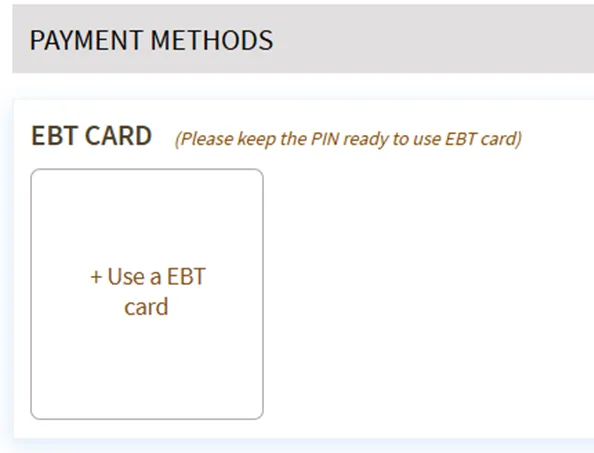
Add Your EBT Card
Select EBT as a payment method and enter your SNAP EBT card information.
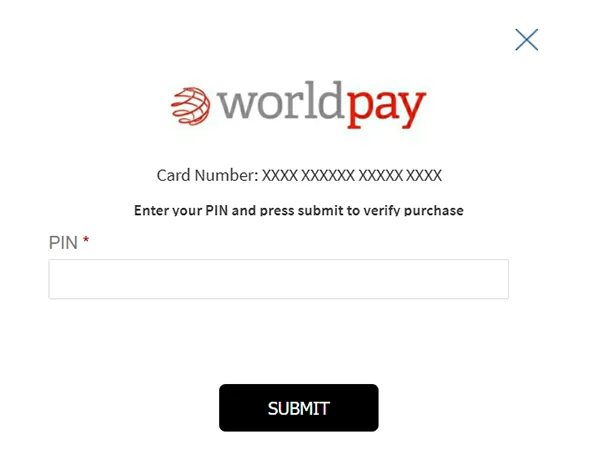
Enter Your PIN
Enter your secure EBT PIN when prompted to verify your card and continue checkout.
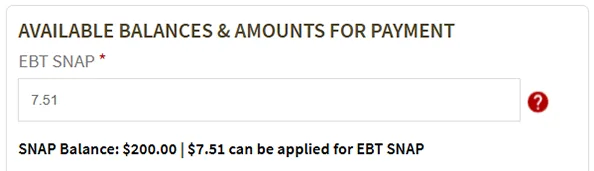
Review Your Balance
Check your available SNAP balance and choose the EBT amount you want to apply.
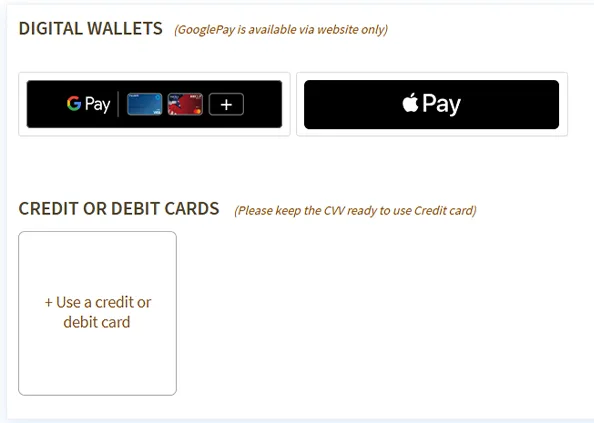
Add Another Payment Method
Add a debit or credit card to cover non-SNAP items, taxes, fees, or any remaining balance.
Place Your Order
Review your payment information and place your order.
What SNAP EBT Can Cover
- Fresh produce
- Meat, poultry, and seafood
- Dairy and eggs
- Pantry staples and bakery items
- Frozen foods and non-alcoholic beverages
Good to Know
- A debit or credit card is required for online SNAP EBT orders.
- SNAP EBT only applies to eligible grocery items.
- Fees, taxes, and non-eligible items must be paid with another card.
- Availability may vary by store location.
Checkout Screen Examples
Use the examples below to see where each step appears during checkout. Screens may look slightly different depending on your device.
Payment Method and EBT Card
Select EBT and enter your SNAP EBT card information.
Enter PIN
Enter your EBT PIN to securely verify your card.
Review Balance
Review your available SNAP balance and amount applied.
Additional Payment Method
Add a debit or credit card for items or fees SNAP does not cover.
Need Help?
If you have questions about using SNAP EBT online, our customer service team can help. Contact us.